
Sales order to dispatch: how one order moves through a factory
Most confusion about an ERP comes from one question: when I click this, what happens to my stock? This guide follows a single order from the day it is approved to the day the goods leave the gate, and says at each step what the system does and where the stock is.
The whole chain at a glance
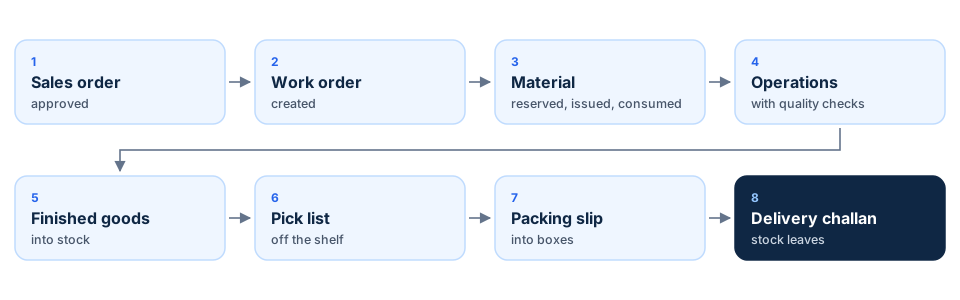
Every step produces one document, and every document carries the sales order number. That is what lets you open any of them and trace back to the customer, or open the order and see how far it has got.
To keep this concrete, we will follow one made-up order all the way through: a customer orders 600 brake discs. There are none in stock, each disc is machined from one casting, and the shop has the castings on the shelf.
The screenshots are from a demo company set up in NextGenManager, so the quantities in them differ from the example.
Step 1: the sales order is approved
A sales order starts as a draft. Nothing happens to stock while it is a draft. Sales submits it, and an approver approves it. Approval is the moment the system starts to act.
On approval the system looks at each line of the order and asks one question: is this in stock?

| Situation | What the system does |
|---|---|
| The product is in stock | Asks stores to set that stock aside for this order |
| Short, and you make it in-house | Creates a work order for the shortfall |
| Short, and you buy it | Raises a purchase requisition for the buyer |
| Short, and you could make or buy it | Sends it to a planner, who sees both costs side by side and decides |
Which row applies is decided by two settings on the product: whether it is purchased, manufactured or both, and whether it is kept in stock or made to order. You set these once.
In our example: the discs are made to order and made in-house, and there are none on the shelf. So approving the order creates a work order for 600 discs.
Step 2: the work order is created
A work order is the instruction to make a quantity of a product. The system builds it from the product's bill of materials, which holds two lists:
- Materials: what goes into one unit. For 600 discs, the work order asks for 600 castings.
- Operations: the steps to make it, in order, and where each is done. Here: turning, drilling, balancing.
The work order is linked to the sales order that caused it. That link matters at the end: when the discs are finished, they are set aside for this customer and not for anyone else.
A work order can also be created by hand, for stock you want to build ahead of orders. The rest of the flow is the same.
Step 3: material is reserved, issued and consumed
This is the part people find hardest, because material passes through three stages and only the last one takes it out of stock.
| Stage | Who does it | What happens to the stock |
|---|---|---|
| Reserved | Stores approves the material request | Still on the shelf, but held for this work order. No other order can take it |
| Issued | Production takes it to the floor | Recorded as on the shop floor. Still counted as stock |
| Consumed | The operator records a batch | Leaves stock. This is the moment it is used up |
Step by step:
- Production releases the work order. This sends stores one material request for each material.
- Stores approves the request. The 600 castings are now reserved. If stores has only 400, it can approve 400 and the work order can start on those.
- Production issues the material. The castings go to the machine. You cannot issue more than stores approved.
- The operator records output. Each time a batch is recorded on the first operation, the castings for that batch are consumed.

If the order is cancelled before anything is made, the reserved castings go back to free stock. If production needs more than planned, because of scrap for example, it raises a further request and stores approves that too. Nothing leaves the store without an approval.
Step 4: quality checks during production
The operator works through the operations in order. After each batch, the operator enters three numbers: how many were good, how many were rejected, and how many were scrapped. Only the good pieces move on to the next operation.
Some operations are marked as inspection points when the product is set up. For those, the system asks for readings after each batch: a diameter, a thickness, a pass or fail on a visual check. Each reading has limits, and a reading outside its limits marks itself as failed. Nobody has to decide.

Readings come in two kinds:
- Ordinary: a failure is recorded and shown, and work carries on.
- Critical: a failure stops the work order from being completed until someone deals with it.
In our example: thickness after turning is a critical check, with limits of 21.8 to 22.2 mm. The operator turns all 600 castings. 580 are good, 15 are rejected for surface marks and 5 are scrapped. Only the 580 go on to drilling.
Step 5: what happens to rejected pieces
A rejected piece is not the same as a scrapped one. Scrap is finished: it is written off. A reject is a question waiting for an answer. Each rejection sits in a list on the work order until someone with the authority decides one of three things:
| Decision | What it means | What the system does |
|---|---|---|
| Accept as is | Good enough to use, on someone's sign-off | The pieces count as good again |
| Rework | Can be put right | Creates a separate rework order for just those pieces |
| Scrap | Cannot be saved | Writes the pieces off |
Every decision needs a reason, and the reason is kept. The same screen shows the yield for the order: how many came through first time, how many needed rework and how many were lost.

In our example: of the 15 rejects, 10 are sent for rework and 5 are scrapped. The main order carries on with 580 discs. The 10 reworked discs will follow on their own order.
Step 6: final inspection and finished goods
When every operation is done, the work order can be completed. Completing is what puts the finished discs into stock. Before it does, the system checks quality one last time, and refuses to complete if any of these is true:
- an inspection was raised for this order and nobody has recorded a result;
- an inspection for this order failed;
- the product is set to need a final inspection and none has passed;
- a critical reading during production failed.
It lists every reason together, so you are not sent back three times for three problems.
If an inspection fails, quality writes a short report saying what is wrong and how many are affected. The decision on that report is one of four: rework, scrap, use as is, or return to the vendor if the fault came in with the material. If the goods are to go ahead anyway, the inspection is waived, with a name and a reason. A waiver is recorded as a waiver. It never shows as a pass, so anyone looking later can see the goods went out on a deviation and who allowed it.

In our example: the inspector checks the batch and passes it. The work order is completed. 580 discs go into finished-goods stock and are set aside for our customer's order straight away.
Step 7: pick, pack and dispatch
Getting the goods out of the door takes three documents, each answering one question.
| Document | The question it answers |
|---|---|
| Pick list | Which goods, and how many, do we take off the shelf for this order? |
| Packing slip | Which box did each piece go into, and what does each box weigh? |
| Delivery challan | What left the gate, when, and on which vehicle? |
Pick
Stores creates a pick list from the sales order, takes the goods off the shelf and confirms what was actually picked. If stores finds fewer than were asked for, it enters the real number. The order is not reduced: the next pick list asks only for what is still owed.
Pack
Packing puts the picked goods into boxes and records each box: its size, its weight, its shipping marks and what is inside. A box can be sent for inspection before it is sealed. If it is, the packing slip cannot be closed until that inspection passes or is waived. The packing list that travels with the shipment is printed from this slip.

Dispatch
Dispatch creates the delivery challan with the transporter and vehicle details and issues it. Issuing the challan is the moment the goods leave your stock and their cost moves to cost of goods sold. The sales order changes to partly or fully dispatched, and the invoice can be raised.

In our example: stores picks 580 discs, packing boxes them in six crates, and dispatch issues the challan. The order shows as partly dispatched: 580 of 600. When the 10 reworked discs are finished, a second pick list asks for them. The last 10 need a decision: make 10 more, or agree a short shipment with the customer.
Where the stock is at every step
This one table answers most "why does the system show that?" questions.
| Step | Castings (raw material) | Discs (finished goods) |
|---|---|---|
| Sales order approved | No change | None in stock; work order created |
| Stores approves the material request | 600 reserved, still on the shelf | No change |
| Material issued to the floor | Still counted as stock | No change |
| Batches recorded on the first operation | 600 consumed: they leave stock | No change |
| Work order completed | No change | 580 added, and reserved for the order |
| Pick list confirmed | No change | Still in stock; the picked units are recorded |
| Packing slip closed | No change | Still in stock; each unit is tied to its box |
| Delivery challan issued | No change | 580 leave stock; cost goes to cost of goods sold |
Two rows surprise people. Material leaves stock when it is consumed, not when it is issued. And finished goods leave stock at the challan, not when they are picked or packed. A crate that is packed and sitting at the gate is still your stock, and the system says so.
Questions people ask
Why can I not complete the work order?
Read the message. It will name an operation that is not finished, an inspection that is waiting or failed, or a critical reading that failed.
We made 580, not 600. Is the work order stuck?
No. An operation is finished when every piece it was given is accounted for: good, rejected or scrapped. The order completes with what was made.
The goods are packed. Why are they still showing in the warehouse?
Because they have not left. Stock moves when the challan is issued.
The customer cancelled. What happens to everything the order started?
Voiding the order releases the stock held for it, and cancels the work orders and purchase requisitions it raised that nobody has started. Work already in progress is left running and named on the order, so that a person decides what to do with it.
Can I skip packing?
Yes. A picked list can go straight to a challan. Packing is there when you need box-level records or a packing list.
Related reading
Follow one of your own orders through
Bring a real order and its bill of materials. We will run it from approval to dispatch on a call and show you where the stock is at each step.